Stores
Introduction
Stores Module addresses Intranet's functionalities on inventory management, consumables, tools and their shelf life.
Before you begin, there are some topics that you need to have a general understanding. It is advised that you read this introduction first:
Traceability
In aviation, all parts, tools and consumables require proper documentation and traceability from the birth to grave. All items must have associated paperwork with part numbers, serial numbers and manufacturer batch numbers and must be easily identifiable. Although quite rare, manufacturers may find defects in their product workmanship and need to recall them.
With proper documentation, we can quickly identify in which component, on which aircraft, the parts were installed. Suspected Unapproved Parts or SUP is a training subject that addresses the importance of using and identifying treaceable, approved parts as opposed to fake ones.
Storage conditions
Aircraft is made of metal, specifically aluminium (you may call it aluminum), at least the conventional one and until recently. Spare parts however, come in many meterials, plastic, steel, carbon or rubber. Each requires different care and storage conditions.
Unless required otherwise, all spare parts and consumables should be kept in a cool and dry place with controlled temperature and humidity. Suggested temperature is not more than 25°c.
Shelf life
Some spart parts and most of the consumables do have life limitation. This is normally described in the labels, certificates of conformant, or TDS.
DANGER
Using expired items is strictly forbidden. Storeman and part users must actively look for shelf life of items being use. As a rule of thumb, keep in mind that everything has an expiration and probably already expired.
WARNING
Some manufacturers use "X" in their expiration date. This can mean either "UNLIMITED" or number "10". You should consult with certificate of conformant, Form 1 or TDS for clarification.
TIP
As a rule of thumb, remember that all items may have expiration date. It is always better to print "UNLIMITED" Shelf Life label than not having any sticker.
Labels
All items in Airborne Support must have appropriate identifying labels in the form of stickers. A label should be able to at least identify the item by its part number, serial number - if any, ABS batch number or OEM batch number.
In case of life limited items, a red shelf life label is needed together with ID label. Integrated label - ID and shelf life - is currently not approved by MOE.
DANGER
DO NOT USE any item without a ID label
WARNING
TAKE CAUTION on any item without expiration label
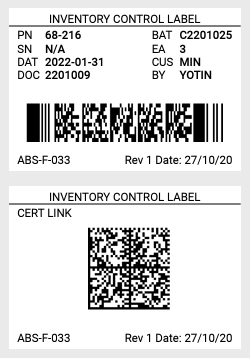
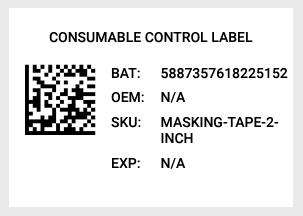
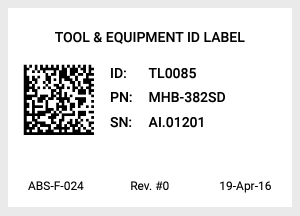
Label examples:
Inventory label (white) & link to certificate
Consumable label (white)
Tool label (white)
Shelf life label (red)

Reports
In most pages or tabs, there is an option to print a report for that page. Reports come in 2 formats, Google Sheet and .csv.
If you use airborne-support email address to sign in into Google Chrome, you should not have any problem generating Google sheet reports. Otherwise, you can still generate but will not be able to view it. This is because the system only allows authenticated user under this organization to view the files.
On the contrary, If you generate .csv file, the browser will download .csv file onto your computer. .csv files can be view using all spreadsheet applications, Excel, Google Sheets or even Notepad.
INFO
All printed or generated reports are considered "uncontrolled", which means they are true at the time of genration only.
Modules
Stores Module is divided into 3 sub modules: